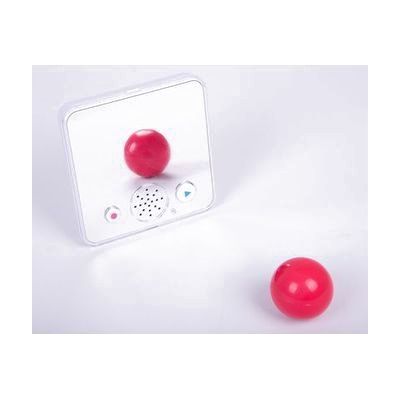
Sound Bank Plus
by AbleNet
Price is what the vendor listed when last checked. Confirm it with the vendor before buying.
Last verified September 16, 2026 · classified April 26, 2026
What it is
Summary
AI-generated from vendor-published content · April 26, 2026
The Sound Bank Plus Mirror is a small, wall-mountable recording device that stores up to 30 seconds of audio and plays it back when activated — essentially a single-message voice recorder with a built-in mirror surface. It's designed for early communication learners, students working on speech and pronunciation, or anyone who benefits from hearing a modeled phrase and seeing themselves respond to it. The device is a complete standalone unit: it accepts a customizable picture or symbol card under a snap-on cover, has three volume levels, and can be secured to a wall or magnetic surface without additional hardware. One important limitation to know before buying: 30 seconds is a single short message, so this works for simple, fixed content (a greeting, a procedure step, a word prompt) but cannot store a vocabulary set or multiple messages.
Quick Facts Catalog facts · auto-generated
- AT Act lending
- Medicaid waiver
- Out of pocket
- School district
What Setup Looks Like
- Out of the box
- Insert batteries and press the record button to record a message up to 30 seconds.
- Press the activation area to play back the recorded message — works right away.
- With a guide
- Print or select a symbol or picture card to slide under the snap-on clear cover as a visual cue.
- Use the three-position volume switch on the back to match the environment (classroom, quiet room, outdoors).
- Enable the record lock button to prevent the message from being accidentally overwritten during use. Allow 10–15 minutes for full setup.
- With professional help
- An SLP or special education teacher can integrate the device into communication or literacy routines, selecting appropriate vocabulary, symbols, and positioning for the individual learner.
- Mounting placement (height, angle for mirror use) may benefit from an OT's input for users with motor or positioning needs.
Getting it
Try Before You Buy
Devices like this are often available to borrow through your state's AT Act program — typically free or low-cost — so you can try it before buying or pursuing funding.
Where to Get It
This is the vendor WhatCanHelp tracks for this product — it may also be available from other retailers or a local supplier, and prices vary.
Some links may be affiliate links — WhatCanHelp may earn a small commission from purchases at no extra cost to you. More on affiliates →
As an Amazon Associate we earn from qualifying purchases.
How to Fund This
Equipment like this is often pursued through official state programs. These are common starting points — each program decides its own eligibility and what it covers, so the first step is always a phone call.
Compare & explore
Sources & fine print
Vendor facts (name, price, platforms, vendor link) sourced from AbleNet — view on vendor site; last verified September 16, 2026.
Classification & description AI-generated from vendor-published content on April 26, 2026 · confidence: high. Vendor specs may lag; verify before relying on details in a clinical or funding artifact.