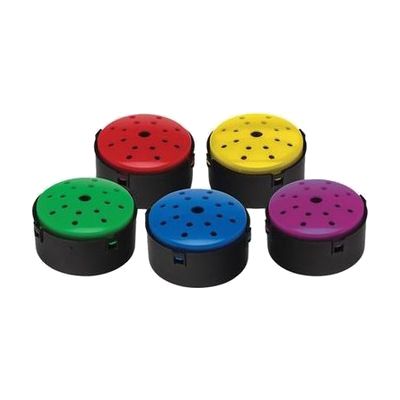
Talking Button
by AbleNet
Last verified July 28, 2026 · classified April 26, 2026
What it is
Summary
AI-generated from vendor-published content · April 26, 2026
The Talking Button is a small, press-to-play recording device that stores and replays up to 10 seconds of audio — enough for a word, short phrase, or reminder message. It's well-suited for people who benefit from simple, single-message communication supports, such as someone learning cause-and-effect, a student practicing choice-making, or someone who needs a low-tech way to signal a need or trigger a routine. You get a pack of five buttons in different colors, each a complete standalone device with its own recording — no app, no companion hardware needed. At roughly 45mm across (about the size of a large coin), these are quite small, so individuals with significant motor impairments may find the activation surface harder to press reliably than larger alternatives like the BIGmack.
Quick Facts Catalog facts · auto-generated
- AT Act lending
- Out of pocket
- School district
What Setup Looks Like
- Out of the box
- Press and hold the record button, speak your message, then release — the button is ready to play back immediately.
- Mount to a board or surface using the built-in mounting feature, or place flat on a table — no tools required.
- With professional help
- An SLP or OT can help identify which vocabulary or messages to record and how to integrate the buttons into a communication or learning routine.
- For users with motor challenges, an ATP can advise on placement and whether a larger activation surface would be more appropriate.
Getting it
Try Before You Buy
Devices like this are often available to borrow through your state's AT Act program — typically free or low-cost — so you can try it before buying or pursuing funding.
Where to Get It
This is the vendor WhatCanHelp tracks for this product — it may also be available from other retailers or a local supplier, and prices vary.
Some links may be affiliate links — WhatCanHelp may earn a small commission from purchases at no extra cost to you. More on affiliates →
As an Amazon Associate we earn from qualifying purchases.
Wondering how equipment like this gets paid for? See the official funding programs in your state.
Compare & explore
Sources & fine print
Vendor facts (name, price, platforms, vendor link) sourced from AbleNet — view on vendor site; last verified July 28, 2026.
Classification & description AI-generated from vendor-published content on April 26, 2026 · confidence: high. Vendor specs may lag; verify before relying on details in a clinical or funding artifact.