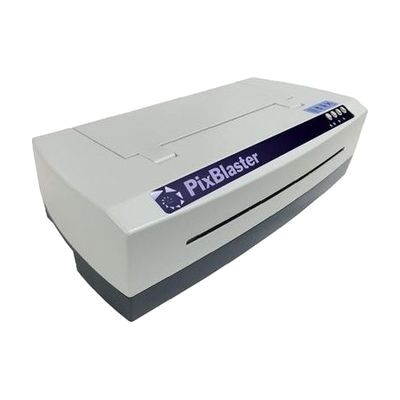
PixBlaster
by American Printing House for the Blind
Last verified June 15, 2026 · classified May 23, 2026
What it is
Summary
AI-generated from vendor-published content · May 23, 2026
The PixBlaster is a braille and tactile graphics embosser from the American Printing House for the Blind — a device that physically punches raised dots and lines onto paper to produce braille text and tactile images. It's primarily aimed at educators, specialists, and families who need to produce braille materials and tactile diagrams in-house rather than ordering them from a production service. You're getting a standalone hardware unit that connects to a computer and requires compatible embossing software (such as Braille Blaster, which APH provides free) to send documents to it. At this price point, the PixBlaster competes with other single-sided embossers like the Index range, but tactile graphics quality and throughput can vary — budget time to calibrate paper tension and test output before relying on it for time-sensitive classroom materials.
Quick Facts Catalog facts · auto-generated
- AT Act lending
- Medicaid waiver
- Out of pocket
- School district
- Vocational rehab
What Setup Looks Like
- Out of the box
Unbox and connect to power — the unit is ready for physical inspection and paper loading. - With a guide
- Connect the embosser to a computer via USB or network interface.
- Install compatible embossing software (APH's free BrailleBlaster or similar) and configure the printer driver for the PixBlaster.
- Run a test emboss using a sample file to verify paper alignment and dot quality — allow 30–60 minutes for initial setup and calibration. See manufacturer support resources and tutorial videos for detailed instructions.
- With professional help
- A certified braille transcriptionist or assistive technology specialist (ATP) should configure software settings for document formatting, graphics rendering, and grade 2 braille translation.
- Staff training on tactile graphics production and file preparation is strongly recommended — plan for 2–4 hours of guided onboarding.
Getting it
Try Before You Buy
Devices like this are often available to borrow through your state's AT Act program — typically free or low-cost — so you can try it before buying or pursuing funding.
Where to Get It
Some links may be affiliate links — WhatCanHelp may earn a small commission from purchases at no extra cost to you. More on affiliates →
How to Fund This
Equipment like this is often pursued through official state programs. These are common starting points — each program decides its own eligibility and what it covers, so the first step is always a phone call.
Compare & explore
Sources & fine print
Vendor facts (name, price, platforms, vendor link) sourced from American Printing House for the Blind — view on vendor site; last verified June 15, 2026.
Classification & description AI-generated from vendor-published content on May 23, 2026 · confidence: high. Vendor specs may lag; verify before relying on details in a clinical or funding artifact.