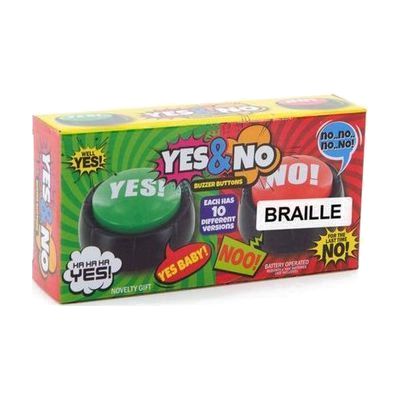
Talking Yes & No Buttons with Braille
by MaxiAids
Last verified June 17, 2026 · classified May 31, 2026
What it is
Summary
AI-generated from vendor-published content · May 31, 2026
Two large, color-coded buzzer buttons — one green for Yes, one red for No — that speak the corresponding word aloud when pressed, with braille labels on each. Designed for someone who needs a simple, low-effort way to respond to yes/no questions but has difficulty with speech, hearing, or reading standard print. This is a complete, self-contained solution: drop in two AAA batteries (not included) and it works immediately. The tradeoff is obvious — these only express two responses, so they're most useful as a quick supplemental tool or starting point for basic communication, not as a standalone communication system.
Quick Facts Catalog facts · auto-generated
- AT Act lending
- Out of pocket
- School district
What Setup Looks Like
- Out of the box
- Insert 2 AAA batteries (not included) into each button.
- Press green button to speak 'Yes,' press red button to speak 'No' — ready immediately.
Getting it
Try Before You Buy
Devices like this are often available to borrow through your state's AT Act program — typically free or low-cost — so you can try it before buying or pursuing funding.
Where to Get It
Some links may be affiliate links — WhatCanHelp may earn a small commission from purchases at no extra cost to you. More on affiliates →
Wondering how equipment like this gets paid for? See the official funding programs in your state.
Compare & explore
Sources & fine print
Vendor facts (name, price, platforms, vendor link) sourced from MaxiAids — view on vendor site; last verified June 17, 2026.
Classification & description AI-generated from vendor-published content on May 31, 2026 · confidence: high. Vendor specs may lag; verify before relying on details in a clinical or funding artifact.