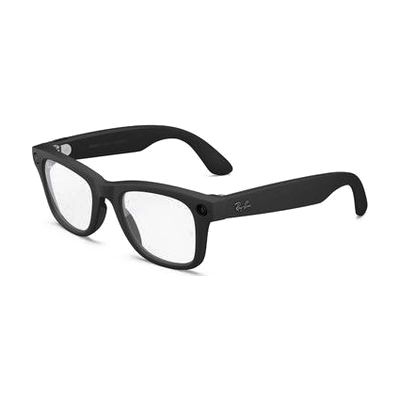
Ray-Ban | Meta Glasses Wayfarer Gen 2
by LS&S
Last verified June 18, 2026 · classified June 7, 2026
What it is
Summary
AI-generated from vendor-published content · June 7, 2026
These are Ray-Ban Wayfarer-style smart glasses with an integrated Meta AI assistant, camera, microphone, and open-ear speakers — all built into a frame that looks like ordinary sunglasses. For someone with low vision, the glasses can describe surroundings, read menus, identify objects, and connect to the Be My Eyes network for real-time sighted assistance, all through voice commands with no phone in hand. People with motor impairments benefit from fully hands-free calling, messaging, and photo capture. This is a complete, wearable solution — the glasses pair with a smartphone app for some features, but core AI assistant and audio functions work independently. Battery life tops out around 8 hours, which may fall short of a full workday for heavy users.
Quick Facts Catalog facts · auto-generated
- AT Act lending
- Out of pocket
- Vocational rehab
What Setup Looks Like
- Out of the box
Put on glasses and power on — open-ear audio and basic voice commands work immediately. - With a guide
- Download the Meta View app and pair via Bluetooth to enable AI features, live translation, and Be My Eyes integration.
- Configure accessibility preferences (voice wake word, audio descriptions, light indicator behavior) — expect 20-30 minutes for initial setup.
- See manufacturer support resources for detailed instructions.
- With professional help
- An orientation and mobility specialist or low vision rehabilitation therapist can help identify which AI description and navigation workflows best match the user's remaining vision and daily routines.
- Budget one or two sessions to evaluate fit within a broader low vision technology plan.
Getting it
Try Before You Buy
Devices like this are often available to borrow through your state's AT Act program — typically free or low-cost — so you can try it before buying or pursuing funding.
Where to Get It
Some links may be affiliate links — WhatCanHelp may earn a small commission from purchases at no extra cost to you. More on affiliates →
How to Fund This
Equipment like this is often pursued through official state programs. These are common starting points — each program decides its own eligibility and what it covers, so the first step is always a phone call.
Compare & explore
Sources & fine print
Vendor facts (name, price, platforms, vendor link) sourced from LS&S — view on vendor site; last verified June 18, 2026.
Classification & description AI-generated from vendor-published content on June 7, 2026 · confidence: high. Vendor specs may lag; verify before relying on details in a clinical or funding artifact.