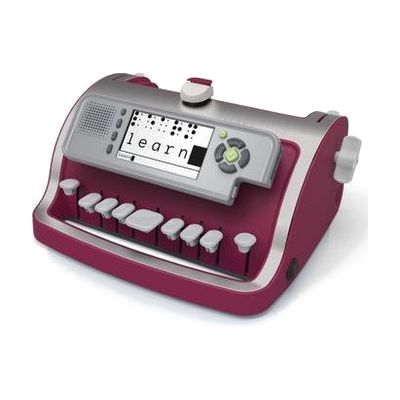
Perkins Smart Brailler
by Perkins
Price is what the vendor listed when last checked. Confirm it with the vendor before buying.
Last verified September 20, 2026 · classified June 8, 2026
What it is
Summary
AI-generated from vendor-published content · June 8, 2026
The Perkins Smart Brailler is an electronic braille writer that embosses braille on standard paper while simultaneously displaying what's being typed on a small screen and reading it aloud through a built-in speaker. That combination — tactile output for the student, visual and audio feedback for sighted teachers and parents — makes it well suited for classrooms where a student is learning braille alongside sighted instructors who may not read braille fluently. A SimBraille display (dots with visual shadows) helps sighted adults follow along without braille literacy. It connects via USB for saving and transferring documents, so it can serve as both a learning tool and a functional writing device. At 8.5 pounds, it's portable but not lightweight — this is a desktop-style device for classroom or home use, not something to carry between classes.
Quick Facts Catalog facts · auto-generated
- AT Act lending
- Out of pocket
- School district
- Vocational rehab
What Setup Looks Like
- Out of the box
Insert paper and press keys to emboss braille — basic mechanical function works right out of the box. - With a guide
- Configure audio voice (male/female), volume, and display settings using the onscreen menu.
- Install necessary USB drivers on a computer to enable document transfer and saving.
- Allow 20–30 minutes for initial configuration. See manufacturer support resources for detailed instructions.
- With professional help
- A Teacher of the Visually Impaired (TVI) should introduce braille code instruction and integrate the device into the student's IEP literacy goals.
- Expect ongoing sessions over weeks to months as the student progresses through the braille curriculum.
Getting it
Try Before You Buy
Devices like this are often available to borrow through your state's AT Act program — typically free or low-cost — so you can try it before buying or pursuing funding.
Where to Get It
This is the vendor WhatCanHelp tracks for this product — it may also be available from other retailers or a local supplier, and prices vary.
Some links may be affiliate links — WhatCanHelp may earn a small commission from purchases at no extra cost to you. More on affiliates →
As an Amazon Associate we earn from qualifying purchases.
How to Fund This
Equipment like this is often pursued through official state programs. These are common starting points — each program decides its own eligibility and what it covers, so the first step is always a phone call.
Compare & explore
Sources & fine print
Vendor facts (name, price, platforms, vendor link) sourced from Perkins — view on vendor site; last verified September 20, 2026.
Classification & description AI-generated from vendor-published content on June 8, 2026 · confidence: high. Vendor specs may lag; verify before relying on details in a clinical or funding artifact.