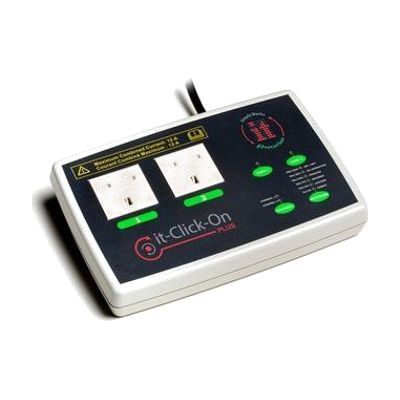
it-Click-On Plus
Price is what the vendor listed when last checked. Confirm it with the vendor before buying.
Last verified September 16, 2026 · classified April 26, 2026
What it is
Summary
AI-generated from vendor-published content · April 26, 2026
The it-Click-On Plus is a mains appliance controller that lets someone using a switch — wired or wireless — turn electrical devices on and off without needing to physically reach or manipulate a standard plug or power button. It has two outlet sockets that can be controlled independently or together, with multiple operating modes including timed activation (counted in minutes or seconds), latched on/off, and a two-switch mode where different people each control one socket cooperatively. It's designed for someone with significant motor limitations who wants to independently control fans, lamps, radios, blenders, or other household appliances using their existing switch setup. This is a standalone hardware unit, but it requires at least one compatible switch (wired via 3.5mm jack, or the it-Switch wireless switch sold separately) to actually do anything — the controller alone won't activate appliances. Note that the 220V/50Hz specification means this is designed for UK and European mains voltage and will not work safely with North American 120V outlets without additional adaptation.
Quick Facts Catalog facts · auto-generated
- AT Act lending
- Medicaid waiver
- Out of pocket
- Vocational rehab
What Setup Looks Like
- Out of the box
- Plug the it-Click-On Plus into a mains wall outlet.
- Plug the appliance(s) you want to control into the device's two output sockets.
- Connect your wired switch(es) via the 3.5mm input jacks, or pair a wireless it-Switch using the LED display pairing function.
- Select your desired control mode (Direct, Latched, Timed, etc.) using the on-board controls — stored settings are retained after power-off.
- With professional help
- An occupational therapist (OT) or assistive technology professional (ATP) can assess which control mode best suits the user's motor abilities and goals — for example, Timed mode for someone who cannot release a switch reliably.
- If integrating into a broader AT setup with multiple switches or shared-use environments, an ATP can configure cooperative or two-switch modes appropriately. See manufacturer support resources for detailed instructions.
Getting it
Try Before You Buy
Devices like this are often available to borrow through your state's AT Act program — typically free or low-cost — so you can try it before buying or pursuing funding.
Where to Get It
This is the vendor WhatCanHelp tracks for this product — it may also be available from other retailers or a local supplier, and prices vary.
Some links may be affiliate links — WhatCanHelp may earn a small commission from purchases at no extra cost to you. More on affiliates →
As an Amazon Associate we earn from qualifying purchases.
How to Fund This
Equipment like this is often pursued through official state programs. These are common starting points — each program decides its own eligibility and what it covers, so the first step is always a phone call.
Compare & explore
Sources & fine print
Vendor facts (name, price, platforms, vendor link) sourced from Inclusive Technology — view on vendor site; last verified September 16, 2026.
Classification & description AI-generated from vendor-published content on April 26, 2026 · confidence: high. Vendor specs may lag; verify before relying on details in a clinical or funding artifact.