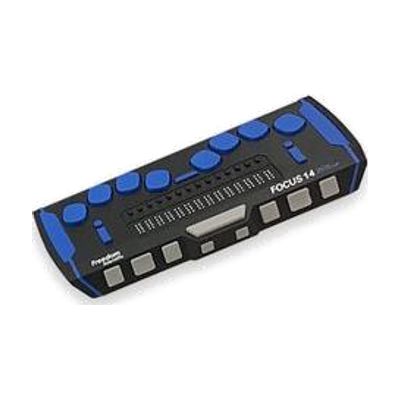
Focus 14 Blue - 5th Generation
Price is what the vendor listed when last checked. Confirm it with the vendor before buying.
Last verified September 16, 2026 · classified April 26, 2026
What it is
Summary
AI-generated from vendor-published content · April 26, 2026
The Focus 14 Blue 5th Generation is a compact 14-cell refreshable braille display that connects wirelessly via Bluetooth to smartphones, tablets, and computers, letting blind or deafblind users read screen content through raised braille pins. It's designed for someone who is blind or has significant vision loss and needs a portable, durable braille output device to use alongside a screen reader like JAWS or NVDA on Windows, or with iOS VoiceOver. This is a peripheral device — it does not function on its own, and you'll need a screen reader running on a compatible device for it to be useful. The 14-cell width means you can only read a short segment of text at a time, making navigation more frequent compared to larger displays; users who read braille extensively at a desk may prefer a 40-cell model.
Quick Facts Catalog facts · auto-generated
- AT Act lending
- Medicaid waiver
- Out of pocket
- School district
- Vocational rehab
What Setup Looks Like
- Out of the box
Power on the display and pair it via Bluetooth to your computer, phone, or tablet. - With a guide
- Enable your screen reader (VoiceOver on iOS/Mac, JAWS or NVDA on Windows) and configure braille output settings to recognize the Focus 14.
- Practice panning commands and navigation keys to move through content efficiently — expect a 30–60 minute orientation with documentation.
- With professional help
- An assistive technology professional (ATP) or orientation and mobility specialist can assess whether 14 cells is sufficient for your reading needs or whether a larger display is warranted.
- An ATP can configure screen reader braille settings, key bindings, and contracted vs. uncontracted braille preferences. See manufacturer support resources for detailed instructions.
Getting it
Try Before You Buy
Devices like this are often available to borrow through your state's AT Act program — typically free or low-cost — so you can try it before buying or pursuing funding.
Where to Get It
This is the vendor WhatCanHelp tracks for this product — it may also be available from other retailers or a local supplier, and prices vary.
Some links may be affiliate links — WhatCanHelp may earn a small commission from purchases at no extra cost to you. More on affiliates →
As an Amazon Associate we earn from qualifying purchases.
How to Fund This
Equipment like this is often pursued through official state programs. These are common starting points — each program decides its own eligibility and what it covers, so the first step is always a phone call.
Compare & explore
Sources & fine print
Vendor facts (name, price, platforms, vendor link) sourced from Freedom Scientific — view on vendor site; last verified September 16, 2026.
Classification & description AI-generated from vendor-published content on April 26, 2026 · confidence: high. Vendor specs may lag; verify before relying on details in a clinical or funding artifact.