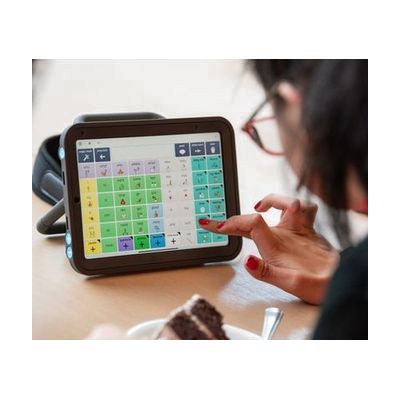
Symbol vocabularies in Grid
by Smartbox Assistive Technology
Contact vendor for pricing
Last verified September 16, 2026 · classified April 26, 2026
What it is
Summary
AI-generated from vendor-published content · April 26, 2026
These are symbol-based vocabulary packages that run inside Grid 3 (Windows software) or Grid for iPad, turning those platforms into full AAC systems. The vocabularies — Super Core, Voco Chat, Aphasia Duo, and PODD Grid sets — organize thousands of words and phrases into navigable grids so that someone who cannot reliably produce spoken language can build messages by selecting symbols with whatever access method works for them (touch, eye gaze, switch scanning, pointer). They suit a wide range of people: children building first communication systems, adults who have had a stroke or acquired aphasia, or anyone who communicates better through symbol-supported language than text. Most of the core vocabularies (Super Core, Voco Chat) are included free with a Grid 3 or Grid for iPad license, but PODD Grid sets require a separate purchase — you need an active Grid software license before any of these do anything at all.
Quick Facts Catalog facts · auto-generated
- AT Act lending
- Insurance
- Medicaid waiver
- Out of pocket
- School district
- Vocational rehab
What Setup Looks Like
- Out of the box
If Super Core or Voco Chat is already loaded in Grid 3 or Grid for iPad, open the vocabulary and begin navigating symbols — no additional installation required. - With a guide
- Download and install Grid 3 on Windows or Grid for iPad on an iPad if not already present.
- Open the Grid software and select or import the desired vocabulary from the built-in library or Smartbox's online Grid Explorer.
- Adjust grid size, symbol set, and color scheme to match the user's vision and motor access needs — allow 30–60 minutes for initial configuration. See manufacturer support resources for detailed instructions.
- With professional help
- An SLP or ATP should conduct a feature-matching assessment to select the most appropriate vocabulary (Super Core, Voco Chat, Aphasia Duo, or a PODD level) based on language level, access method, and communication goals.
- Programming and customization — adding personal vocabulary, configuring switch scanning parameters, or adapting PODD page sets — typically requires multiple sessions over several weeks.
- Ongoing therapy is strongly recommended to support motor learning of navigation pathways and to expand vocabulary use across settings.
Getting it
Try Before You Buy
Devices like this are often available to borrow through your state's AT Act program — typically free or low-cost — so you can try it before buying or pursuing funding.
Where to Get It
This is the vendor WhatCanHelp tracks for this product — it may also be available from other retailers or a local supplier, and prices vary.
Some links may be affiliate links — WhatCanHelp may earn a small commission from purchases at no extra cost to you. More on affiliates →
As an Amazon Associate we earn from qualifying purchases.
How to Fund This
Equipment like this is often pursued through official state programs. These are common starting points — each program decides its own eligibility and what it covers, so the first step is always a phone call.
Compare & explore
Sources & fine print
Vendor facts (name, price, platforms, vendor link) sourced from Smartbox Assistive Technology — view on vendor site; last verified September 16, 2026.
Classification & description AI-generated from vendor-published content on April 26, 2026 · confidence: high. Vendor specs may lag; verify before relying on details in a clinical or funding artifact.