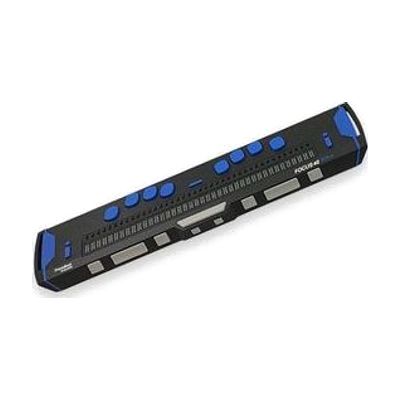
Focus 40 Blue - 5th Generation
Contact vendor for pricing
What it is
Summary
AI-generated from vendor-published content · October 1, 2026
The Focus 40 Blue is a portable braille display with 40 cells. It raises and lowers pins to show what's on a computer or phone screen as braille, so someone who reads braille can follow text by touch. It's built tough, with an aluminum housing on a steel base, bumpers that absorb knocks, and drop testing to a US military standard. A single smooth cap covers the cells so you feel only the pins, and the dot keys and spacebar are made to feel smooth and run quietly. The name points to Bluetooth, and the vendor notes that iOS connection needs iOS 11. You'll need a screen reader on your computer or phone for it to have anything to show.
Getting it
Try before you buy
Devices like this are often available to borrow through your state's AT Act program — typically free or low-cost — so you can try it before buying or pursuing funding.
Where to get it
This is the vendor WhatCanHelp tracks for this product — it may also be available from other retailers or a local supplier, and prices vary.
How to fund this
These are common places to ask about paying for equipment like this. Each one decides its own eligibility and what it covers, so start by asking them.
Details
Quick Facts Catalog facts · auto-generated
- Type
- Addresses
- Platform
- Age range
- Complexity
- Setup with instructions
- Price
- —
- Funding
- AT Act lending
- Out of pocket
- School district
- Vocational rehab
What setup looks like
- Out of the box
Turn the display on and read the manufacturer's quick-start information to learn the keys and basic controls. - With a guide
- Pair the display with your phone, tablet, or computer, usually over Bluetooth. Turn on your screen reader's braille support and choose this display.
- Practice the dot keys and spacebar commands for moving around the screen and typing. Expect about 30 to 60 minutes to get connected and comfortable. See manufacturer support resources for detailed instructions.
Compare & explore
Sources & fine print
Vendor facts (name, price, platforms, vendor link) sourced from Freedom Scientific — view on vendor site (opens in a new tab); last checked October 31, 2026.
Classification & description AI-generated from vendor-published content on October 1, 2026 · confidence: high. Vendor specs may lag; verify before relying on details in a clinical or funding artifact.