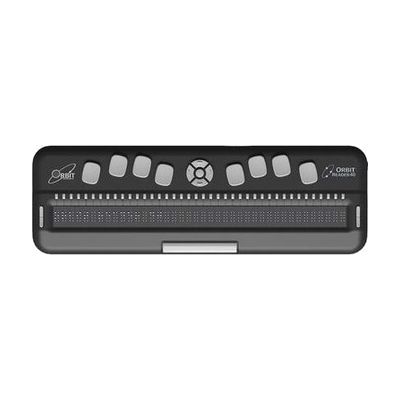
Orbit Reader 40 Braille Display Book Reader
Last verified July 29, 2026 · classified April 26, 2026
What it is
Summary
AI-generated from vendor-published content · April 26, 2026
The Orbit Reader 40 is a 40-cell refreshable braille display that does triple duty: it can function as a standalone book reader (pulling files from an SD card or USB drive), a note-taker with a full Perkins-style 8-key braille keyboard, and a braille display paired with a computer or phone via USB or Bluetooth. It's well-suited for a blind or deafblind person who wants one portable device for both independent reading and accessing content on their smartphone, tablet, or computer — across virtually any platform including iOS, Android, Windows, Mac, and Linux. This is a self-contained, complete solution: the device ships ready to use in standalone mode, and pairing with screen readers like JAWS, NVDA, or VoiceOver is handled through standard Bluetooth or USB connections. At 40 cells, it offers a meaningfully wider reading window than 20-cell alternatives, but the nearly $1,900 price point and the learning curve for braille literacy and device navigation mean most users benefit from guidance from an orientation and mobility specialist or vision rehabilitation therapist before purchase.
Quick Facts Catalog facts · auto-generated
- AT Act lending
- Insurance
- Medicaid waiver
- Out of pocket
- Vocational rehab
What Setup Looks Like
- Out of the box
Insert an SD card with DAISY or BRF files and power on to read books immediately in standalone mode — no pairing or software required. - With a guide
- Enable Bluetooth on your phone or computer and pair the Orbit Reader 40 following the device's pairing menu.
- In your screen reader settings (VoiceOver, TalkBack, JAWS, NVDA, etc.), select the Orbit Reader 40 as the active braille display.
- Adjust display settings (braille grade, language, key bindings) to match your preferences — allow 30–60 minutes for initial pairing and configuration. See manufacturer support resources for detailed instructions.
- With professional help
- A vision rehabilitation therapist (VRT) or certified braille instructor should assess the user's braille literacy level and recommend appropriate braille grade settings (contracted vs. uncontracted).
- An assistive technology professional (ATP) can configure screen reader integration, set up file management workflows, and train the user on switching between standalone, note-taker, and display modes — typically 2–4 sessions over several weeks.
Getting it
Try Before You Buy
Devices like this are often available to borrow through your state's AT Act program — typically free or low-cost — so you can try it before buying or pursuing funding.
Where to Get It
This is the vendor WhatCanHelp tracks for this product — it may also be available from other retailers or a local supplier, and prices vary.
Some links may be affiliate links — WhatCanHelp may earn a small commission from purchases at no extra cost to you. More on affiliates →
As an Amazon Associate we earn from qualifying purchases.
How to Fund This
Equipment like this is often pursued through official state programs. These are common starting points — each program decides its own eligibility and what it covers, so the first step is always a phone call.
Compare & explore
Sources & fine print
Vendor facts (name, price, platforms, vendor link) sourced from Orbit Research — view on vendor site; last verified July 29, 2026.
Classification & description AI-generated from vendor-published content on April 26, 2026 · confidence: high. Vendor specs may lag; verify before relying on details in a clinical or funding artifact.