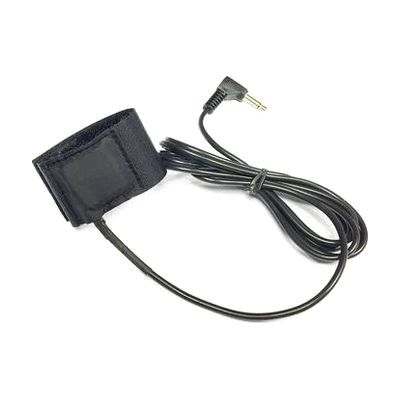
FingerButton Switch Dual
Last verified June 20, 2026 · classified April 26, 2026
What it is
Summary
AI-generated from vendor-published content · April 26, 2026
The FingerButton Switch Dual is a pair of small switches that wrap around a finger and send activation signals when pressed, requiring very little force to trigger. It's designed for someone who has limited hand strength or dexterity but retains enough finger movement to tap or press, and who needs to control two separate switch-accessible functions — for example, scanning through AAC software or operating a powered device. This is the switch hardware only: you'll need a switch-accessible device (AAC software, computer, powered toy, environmental control) and likely a 3.5mm mono cable or the optional Y-cable splitter to route each switch independently. The finger-mounted form factor is more discreet and position-flexible than a traditional desktop switch, but fitting it comfortably and positioning it for reliable activation typically takes some trial and adjustment with an occupational therapist or ATP.
Quick Facts Catalog facts · auto-generated
- AT Act lending
- Medicaid waiver
- Out of pocket
- School district
- Vocational rehab
What Setup Looks Like
- Out of the box
Slide each switch band onto a finger — activating the switch should produce an immediate signal through the cable. - With a guide
- Connect the switches via 3.5mm cable to a switch-accessible device or interface.
- If routing each switch to a separate function, obtain the optional Y-cable splitter and connect accordingly.
- Test activation force and finger placement to confirm reliable triggering — allow 20–30 minutes for initial fitting.
- With professional help
- An occupational therapist (OT) or assistive technology professional (ATP) should assess which finger, hand, and mounting angle produces the most reliable activation with least fatigue.
- Integration with AAC or environmental control software requires configuration by an SLP or ATP familiar with the target device's switch access settings.
- See manufacturer support resources for detailed instructions.
Getting it
Try Before You Buy
Devices like this are often available to borrow through your state's AT Act program — typically free or low-cost — so you can try it before buying or pursuing funding.
Where to Get It
Some links may be affiliate links — WhatCanHelp may earn a small commission from purchases at no extra cost to you. More on affiliates →
As an Amazon Associate we earn from qualifying purchases.
How to Fund This
Equipment like this is often pursued through official state programs. These are common starting points — each program decides its own eligibility and what it covers, so the first step is always a phone call.
Compare & explore
Sources & fine print
Vendor facts (name, price, platforms, vendor link) sourced from Inclusive Technology — view on vendor site; last verified June 20, 2026.
Classification & description AI-generated from vendor-published content on April 26, 2026 · confidence: high. Vendor specs may lag; verify before relying on details in a clinical or funding artifact.