SENse Flex+
Last verified June 20, 2026 · classified April 26, 2026
What it is
Summary
AI-generated from vendor-published content · April 26, 2026
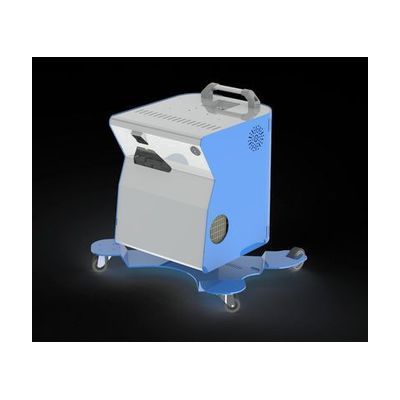
The SENse Flex+ is a motorized, height-adjustable projector system that displays interactive sensory content onto a table surface, the floor, or a wall — allowing users to engage with projected light and movement without needing a separate screen. It's designed for people with complex needs, including those with profound and multiple learning disabilities (PMLD), autism, or limited mobility, who benefit from sensory stimulation and cause-and-effect play in flexible environments. The system is portable, meaning it can be repositioned to suit a range of postures — floor-based play, wheelchair-seated interaction, or upright wall engagement — making it adaptable across settings. This is a full standalone unit but will likely require content (software or apps) to run through it, and the motorized adjustment and interactive features add complexity that typically benefits from setup support by a teacher or therapist.
Quick Facts Catalog facts · auto-generated
- AT Act lending
- Medicaid waiver
- Out of pocket
- School district
What Setup Looks Like
- Out of the box
Power on the unit and position the projector arm to direct the beam at the desired surface (floor, table, or wall). - With a guide
- Use the electronic height adjustment controls to set the projection height for the user's access position (floor, table, or wheelchair level).
- Connect a compatible content source (tablet, laptop, or built-in software) and select appropriate sensory activities.
- Calibrate the interactive touch/projection zone on the target surface — allow 30-60 minutes for initial setup. See manufacturer support resources for detailed instructions.
- With professional help
- A special education teacher, occupational therapist (OT), or sensory integration specialist can assess the user's sensory needs and recommend appropriate content and positioning.
- Initial deployment in a school or therapy setting typically involves 1-2 sessions to configure height, content library, and access method for each user.
Getting it
Try Before You Buy
Devices like this are often available to borrow through your state's AT Act program — typically free or low-cost — so you can try it before buying or pursuing funding.
Where to Get It
Some links may be affiliate links — WhatCanHelp may earn a small commission from purchases at no extra cost to you. More on affiliates →
As an Amazon Associate we earn from qualifying purchases.
How to Fund This
Equipment like this is often pursued through official state programs. These are common starting points — each program decides its own eligibility and what it covers, so the first step is always a phone call.
Compare & explore
Sources & fine print
Vendor facts (name, price, platforms, vendor link) sourced from Inclusive Technology — view on vendor site; last verified June 20, 2026.
Classification & description AI-generated from vendor-published content on April 26, 2026 · confidence: medium. Vendor specs may lag; verify before relying on details in a clinical or funding artifact.