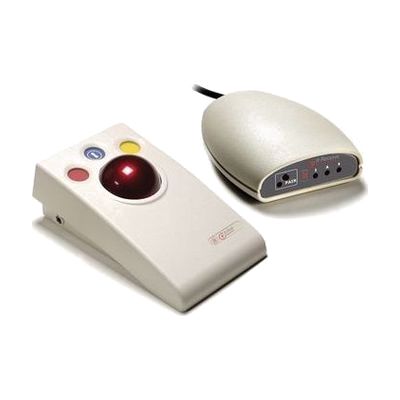
it-Roll Starter Pack
Last verified June 20, 2026 · classified April 26, 2026
What it is
Summary
AI-generated from vendor-published content · April 26, 2026
The it-Roll Starter Pack is a wireless trackball controller paired with a USB receiver, designed for people who find a standard mouse difficult to use due to limited hand control, tremor, or reduced dexterity — the ball rolls to move the cursor rather than requiring the user to drag a mouse across a surface. It's well-suited for classroom or group settings where a single computer needs to be shared among multiple users, since the receiver can handle up to six it-Roll devices at once from up to 10 metres away. The pack includes both the rollerball and receiver, so it connects and works as soon as you plug the USB dongle into any computer — no software installation required. One thing to be aware of: the rollerball buttons handle clicking, but users with very limited finger strength may still find button activation challenging, and a separate switch or button interface may be needed for those individuals.
Quick Facts Catalog facts · auto-generated
- AT Act lending
- Medicaid waiver
- Out of pocket
- School district
- Vocational rehab
What Setup Looks Like
- Out of the box
- Plug the it-Receive USB receiver into any computer — it will be recognized as a standard input device with no drivers needed.
- Power on the it-Roll rollerball and begin using it to control the cursor immediately.
- With a guide
- If using multiple it-Roll units simultaneously, pair each device to the single receiver following the manufacturer's pairing instructions.
- Position rollerball units at appropriate distances and angles for each user's access needs — typically 15–30 minutes for a group setup. See manufacturer support resources for detailed instructions.
- With professional help
An occupational therapist (OT) or assistive technology professional (ATP) can assess whether a rollerball is the right access method, evaluate grip and activation style, and recommend complementary switch or mount solutions if button clicking remains a barrier.
Getting it
Try Before You Buy
Devices like this are often available to borrow through your state's AT Act program — typically free or low-cost — so you can try it before buying or pursuing funding.
Where to Get It
Some links may be affiliate links — WhatCanHelp may earn a small commission from purchases at no extra cost to you. More on affiliates →
As an Amazon Associate we earn from qualifying purchases.
How to Fund This
Equipment like this is often pursued through official state programs. These are common starting points — each program decides its own eligibility and what it covers, so the first step is always a phone call.
Compare & explore
Sources & fine print
Vendor facts (name, price, platforms, vendor link) sourced from Inclusive Technology — view on vendor site; last verified June 20, 2026.
Classification & description AI-generated from vendor-published content on April 26, 2026 · confidence: high. Vendor specs may lag; verify before relying on details in a clinical or funding artifact.