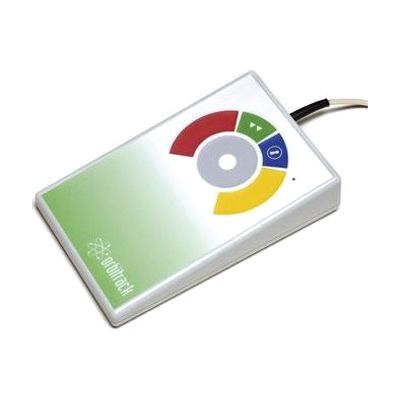
Orbitrack
Last verified June 20, 2026 · classified April 26, 2026
What it is
Summary
AI-generated from vendor-published content · April 26, 2026
The Orbitrack is an alternative computer pointer device that replaces a traditional mouse by letting users control cursor movement through a large circular ring — fingers or a hand rest on or near the ring and guide it without gripping, clicking, or moving the wrist. It's designed for people who find conventional mice painful or impossible to use due to limited hand strength, reduced dexterity, tremor, or conditions like cerebral palsy or RSI. The device arrives fully plug-and-play via USB and works on Windows, Mac, and iOS/iPadOS without driver installation, making it a largely self-contained solution — though you'll want to spend time adjusting the four speed settings to match the user's control range. One honest consideration: the ring-based input method is genuinely different from anything most users have tried, so expect a learning curve of days to weeks before cursor control feels natural, and the price point reflects its specialized design.
Quick Facts Catalog facts · auto-generated
- AT Act lending
- Medicaid waiver
- Out of pocket
- School district
- Vocational rehab
What Setup Looks Like
- Out of the box
- Plug the USB cable into your PC, Mac, or iPad — the Orbitrack is recognized automatically with no driver installation needed.
- Use the color-coded buttons to cycle through the four cursor speed settings until movement feels comfortable.
- Enable drag lock and double-click functions via the dedicated buttons if needed for the user's workflow.
- With a guide
- Review Inclusive Technology's setup guide to understand all button functions, including switchable left/right click and resettable memory for saving preferences.
- For iPad use, navigate to Settings > Accessibility > Switch Control or Pointer Control to configure iOS assistive pointer settings alongside the Orbitrack.
- Allow 1–2 weeks of daily practice to build fluency with the ring-based cursor control method. See manufacturer support resources for detailed instructions.
- With professional help
- An occupational therapist (OT) or assistive technology professional (ATP) can assess whether the Orbitrack is the best pointer solution for the user's specific motor profile compared to alternatives like joysticks, head mice, or eye gaze.
- An ATP can fine-tune speed settings and button assignments in the context of the user's full workstation setup. Expect 1–2 sessions to optimize.
Getting it
Try Before You Buy
Devices like this are often available to borrow through your state's AT Act program — typically free or low-cost — so you can try it before buying or pursuing funding.
Where to Get It
Some links may be affiliate links — WhatCanHelp may earn a small commission from purchases at no extra cost to you. More on affiliates →
As an Amazon Associate we earn from qualifying purchases.
How to Fund This
Equipment like this is often pursued through official state programs. These are common starting points — each program decides its own eligibility and what it covers, so the first step is always a phone call.
Compare & explore
Sources & fine print
Vendor facts (name, price, platforms, vendor link) sourced from Inclusive Technology — view on vendor site; last verified June 20, 2026.
Classification & description AI-generated from vendor-published content on April 26, 2026 · confidence: high. Vendor specs may lag; verify before relying on details in a clinical or funding artifact.