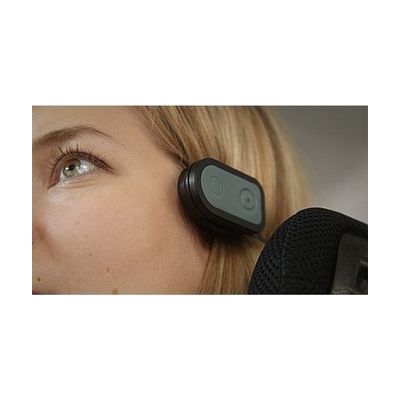
Quha Zono Mouse Accessories
by Quha
Price is what the vendor listed when last checked. Confirm it with the vendor before buying.
Accessory or replacement part Made to go with another product — check it fits what you have.
Last verified September 16, 2026 · classified April 26, 2026
What it is
Summary
AI-generated from vendor-published content · April 26, 2026
These are mounting and accessory options for the Quha Zono Mouse X, a gyroscopic head-controlled wireless mouse — they are not the mouse itself, but the hardware that lets users wear or position it on their body. Depending on which accessory is chosen, the mouse can attach via an adjustable headband with a magnetic holder, an ear clip, or eyeglass frames, making it practical for people who move their heads to control cursor movement on screen. One option, the Quha Sento, adds a contactless puff switch so users can trigger mouse clicks without any hand or finger movement. These accessories are only compatible with the Quha Zono Mouse X — they do not work with earlier Quha Zono models, so verify your specific device before ordering.
Quick Facts Catalog facts · auto-generated
- Medicaid waiver
- Out of pocket
- Vocational rehab
What Setup Looks Like
- Out of the box
Attach the chosen accessory (headband, ear clip, or eyeglass clip) to the body and magnetically snap the Quha Zono Mouse X into the holder. - With a guide
- Review the Quha Zono Mouse X documentation to confirm accessory compatibility with your specific device.
- For the Sento puff switch option, connect the 3.5mm switch cable to the headband holder to enable left-click functionality.
- Adjust fit for comfort and calibrate cursor sensitivity in the paired device's mouse settings — expect 15–30 minutes total. See manufacturer support resources for detailed instructions.
- With professional help
- An occupational therapist (OT) or assistive technology professional (ATP) can help determine the best mounting style based on the user's head control, range of motion, and fatigue tolerance.
- If the Sento puff switch is selected, an SLP or ATP may assist with sensitivity calibration and training — typically 1–2 sessions.
Getting it
Many states lend devices like this for free trial periods — find your state's AT lending program.
Where to Get It
This is the vendor WhatCanHelp tracks for this product — it may also be available from other retailers or a local supplier, and prices vary.
Some links may be affiliate links — WhatCanHelp may earn a small commission from purchases at no extra cost to you. More on affiliates →
As an Amazon Associate we earn from qualifying purchases.
How to Fund This
Equipment like this is often pursued through official state programs. These are common starting points — each program decides its own eligibility and what it covers, so the first step is always a phone call.
Compare & explore
Sources & fine print
Vendor facts (name, price, platforms, vendor link) sourced from Quha — view on vendor site; last verified September 16, 2026.
Classification & description AI-generated from vendor-published content on April 26, 2026 · confidence: high. Vendor specs may lag; verify before relying on details in a clinical or funding artifact.