Ultra Joystick
Contact vendor for pricing
What it is
Summary
AI-generated from vendor-published content · October 1, 2026
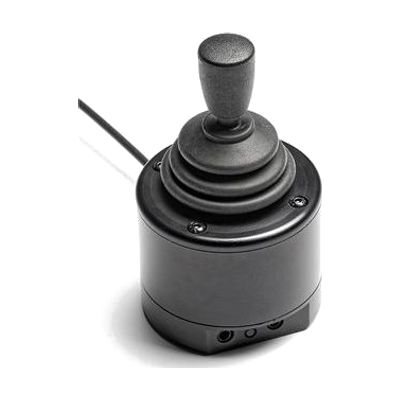
The Ultra Joystick is a small USB joystick that lets someone move the cursor with their head or chin instead of their hands. It has a metal body and metal mounting holes, so it holds up well when fixed to a mount. Two 3.5mm sockets take any switch for clicking, and you can program them for left click, right click, double click, or drag. Dwell click lets it click on its own when the cursor rests in one spot, so a switch isn't required. It has four cursor speeds and comes with several knobs to choose from. It also works with Switch Control on iPad and iPhone. It measures about 5cm x 5cm x 11cm, and you'll need a mounting setup that puts it in the right spot for the user.
Getting it
Try before you buy
Devices like this are often available to borrow through your state's AT Act program — typically free or low-cost — so you can try it before buying or pursuing funding.
Where to get it
This is the vendor WhatCanHelp tracks for this product — it may also be available from other retailers or a local supplier, and prices vary.
How to fund this
These are common places to ask about paying for equipment like this. Each one decides its own eligibility and what it covers, so start by asking them.
Details
Quick Facts Catalog facts · auto-generated
What setup looks like
- Out of the box
Plug the joystick into the USB port of your computer or iPad and try moving the cursor with one of the knobs. - With a guide
- Pick a knob that feels comfortable, then set one of the four cursor speeds.
- Plug in a switch if you want one, and program its click function. Or turn on dwell click to click without a switch.
- With professional help
An OT or ATP can help choose the best mounting position and knob for head or chin use, test switch and dwell settings, and check that the setup is comfortable and reliable. Plan on one or more sessions. See manufacturer support resources for detailed instructions.
Compare & explore
Sources & fine print
Vendor facts (name, price, platforms, vendor link) sourced from Inclusive Technology — view on vendor site (opens in a new tab); last checked October 31, 2026.
Classification & description AI-generated from vendor-published content on October 1, 2026 · confidence: high. Vendor specs may lag; verify before relying on details in a clinical or funding artifact.