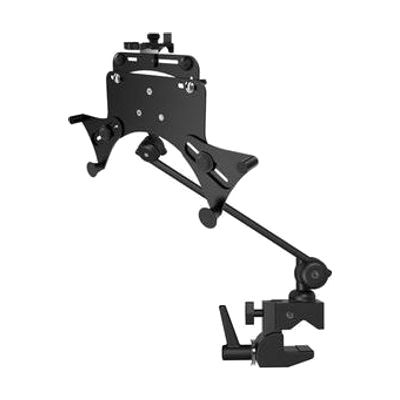
Inclusive Mounting for Universal Tablet Holder
Last verified June 20, 2026 · classified April 26, 2026
What it is
Summary
AI-generated from vendor-published content · April 26, 2026
This is an adjustable arm-and-clamp system that holds a tablet (7" to 13") in a fixed position at the user's workstation, wheelchair, or table — keeping the screen stable and hands-free without blocking any ports or the display. It's designed for someone who can't comfortably hold a tablet for extended use, or who needs the screen positioned precisely for eye gaze, switch access, or AAC use. You get a complete mounting kit — tablet holder, Quick Release arm tubes (single, double, or triple length options), and a Super Clamp — so it's ready to attach once you choose your configuration. The main tradeoff to know upfront: the right tube configuration depends heavily on your specific setup (wheelchair arm height, desk depth, user reach), so getting this wrong means buying additional tubes or the wrong kit.
Quick Facts Catalog facts · auto-generated
- AT Act lending
- Medicaid waiver
- Out of pocket
- School district
- Vocational rehab
What Setup Looks Like
- Out of the box
Attach the Super Clamp to a wheelchair arm, table edge, or desk tube — no tools needed for the clamp. - With a guide
- Connect the tube segments using Quick Release joints — single, double, or triple depending on the reach needed.
- Insert the tablet into the Universal Tablet Holder and tighten the adjustment knobs; use the included 2.5mm Allen key to fine-tune.
- Position and angle the arm for the user's sightline and reach — allow 15–30 minutes for initial positioning. See manufacturer support resources for detailed instructions.
- With professional help
- An occupational therapist (OT) or assistive technology professional (ATP) should assess optimal tablet angle, height, and reach — especially for wheelchair users or those using eye gaze or switch access.
- Integration with an AAC system or eye gaze device may require additional positioning consultation.
Getting it
Try Before You Buy
Devices like this are often available to borrow through your state's AT Act program — typically free or low-cost — so you can try it before buying or pursuing funding.
Where to Get It
Some links may be affiliate links — WhatCanHelp may earn a small commission from purchases at no extra cost to you. More on affiliates →
As an Amazon Associate we earn from qualifying purchases.
How to Fund This
Equipment like this is often pursued through official state programs. These are common starting points — each program decides its own eligibility and what it covers, so the first step is always a phone call.
Compare & explore
Sources & fine print
Vendor facts (name, price, platforms, vendor link) sourced from Inclusive Technology — view on vendor site; last verified June 20, 2026.
Classification & description AI-generated from vendor-published content on April 26, 2026 · confidence: high. Vendor specs may lag; verify before relying on details in a clinical or funding artifact.