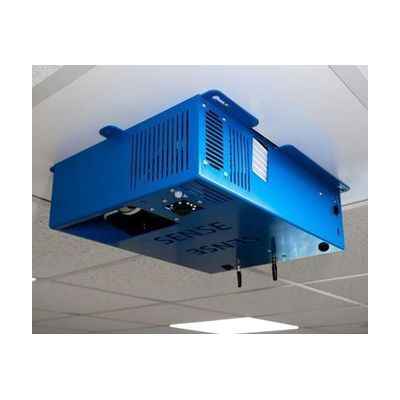
SENse Ceiling Tile
Est. $3,000–$6,000, see price history
Typical price range, not a vendor quote. Confirm it with the vendor before buying.
What it is
Summary
AI-generated from vendor-published content · October 1, 2026
The SENse Ceiling Tile is a projector built into a ceiling-mounted unit that casts a large, bright, interactive image onto the floor. People can step, move, or reach into the projected activities to play with them. It comes with Imaginate software, which has more than 350 activities already installed, so there is plenty to try right away. It suits a classroom, therapy room, or sensory space where you want movement-based play and learning for children or adults.
Getting it
Try before you buy
Devices like this are often available to borrow through your state's AT Act program — typically free or low-cost — so you can try it before buying or pursuing funding.
Where to get it
This is the vendor WhatCanHelp tracks for this product — it may also be available from other retailers or a local supplier, and prices vary.
How to fund this
These are common places to ask about paying for equipment like this. Each one decides its own eligibility and what it covers, so start by asking them.
Details
Quick Facts Catalog facts · auto-generated
- Platform
- Age range
- Complexity
- Setup with instructions
- Price
- Est. $3,000–$6,000
- Funding
- AT Act lending
- Medicaid waiver
- Out of pocket
- School district
What setup looks like
- With a guide
- Choose a room with a clear floor area and a ceiling that can safely hold the fixed unit.
- Fit the unit to the ceiling and connect power, following the manufacturer's installation instructions. Allow an hour or two, and bring a second person or a facilities worker if needed.
- Open the pre-installed Imaginate software, try a few activities, and adjust the projected image on the floor. See manufacturer support resources for detailed instructions.
Compare & explore
Sources & fine print
Vendor facts (name, price, platforms, vendor link) sourced from Inclusive Technology — view on vendor site (opens in a new tab); last checked October 31, 2026.
Classification & description AI-generated from vendor-published content on October 1, 2026 · confidence: medium. Vendor specs may lag; verify before relying on details in a clinical or funding artifact.