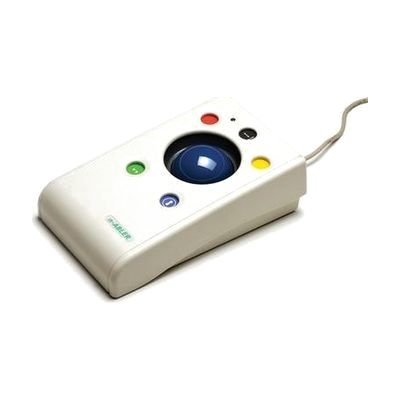
n-ABLER Rollerball
Price is what the vendor listed when last checked. Confirm it with the vendor before buying.
Last verified September 16, 2026 · classified June 9, 2026
What it is
Summary
AI-generated from vendor-published content · June 9, 2026
The n-ABLER Rollerball is a large-footprint trackball mouse designed for people who have difficulty using a standard mouse due to limited hand strength, reduced range of motion, or fine motor challenges — common in conditions like cerebral palsy, MS, or post-stroke recovery. The ball moves with minimal force, so users don't need to grip or push a mouse across a surface; instead, they roll the ball with whatever hand or finger movement they have available. It includes drag lock, axis locking (which restricts cursor movement to one direction at a time), left/right click switching, and a double-click button — features that reduce the number of precise movements required. The device connects via USB to PC or Mac with no driver installation, and also works with iPad and iPhone through an adapter via iOS Switch Control. At roughly 23cm wide, this is a substantial piece of hardware — it won't suit people who need a compact or portable input device.
Quick Facts Catalog facts · auto-generated
- AT Act lending
- Out of pocket
- School district
- Vocational rehab
What Setup Looks Like
- Out of the box
Plug into a USB port on PC or Mac — cursor control works immediately, no drivers needed. - With a guide
- Configure button assignments (left/right click swap, drag lock, axis lock) using the onboard controls or manufacturer documentation.
- For iPad/iPhone use, connect via USB-to-Lightning or USB-C adapter and enable Switch Control or pointer access in iOS Accessibility settings — allow 15–20 minutes.
- See manufacturer support resources for detailed instructions.
- With professional help
- An occupational therapist (OT) or assistive technology professional (ATP) can assess whether axis locking, drag lock, or specific button configurations best match the user's motor profile.
- Integration into a workplace or school setup with custom configurations typically takes one session of 30–60 minutes.
Getting it
Try Before You Buy
Devices like this are often available to borrow through your state's AT Act program — typically free or low-cost — so you can try it before buying or pursuing funding.
Where to Get It
This is the vendor WhatCanHelp tracks for this product — it may also be available from other retailers or a local supplier, and prices vary.
Some links may be affiliate links — WhatCanHelp may earn a small commission from purchases at no extra cost to you. More on affiliates →
As an Amazon Associate we earn from qualifying purchases.
How to Fund This
Equipment like this is often pursued through official state programs. These are common starting points — each program decides its own eligibility and what it covers, so the first step is always a phone call.
Compare & explore
Sources & fine print
Vendor facts (name, price, platforms, vendor link) sourced from Inclusive Technology — view on vendor site; last verified September 16, 2026.
Classification & description AI-generated from vendor-published content on June 9, 2026 · confidence: high. Vendor specs may lag; verify before relying on details in a clinical or funding artifact.