Clicker
Price is what the vendor listed when last checked. Confirm it with the vendor before buying.
Last verified September 16, 2026 · classified April 26, 2026
What it is
Summary
AI-generated from vendor-published content · April 26, 2026
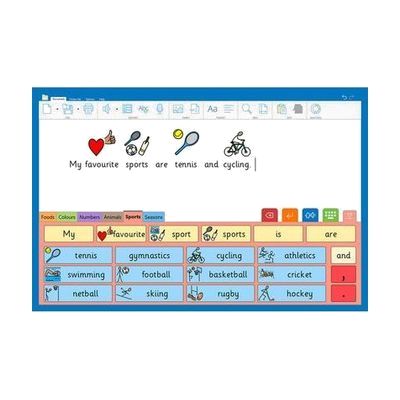
Clicker is a writing support application from Crick Software designed to help students who struggle with the mechanics of writing — it combines a word processor with built-in text-to-speech, word prediction, symbol support, and picture grids to scaffold the writing process from planning through editing. It's particularly well suited for students with dyslexia, physical disabilities affecting typing, language delays, or autism who benefit from visual and auditory supports alongside written work. The software includes pre-built and customizable 'ClikBoards' — on-screen grids of words, phrases, or symbols that students can select to build sentences, reducing the barrier of blank-page anxiety and keyboard demands. Note that Clicker is a subscription or licensed product that requires installation on a device and typically benefits from teacher or SLP involvement to set up appropriate vocabulary grids and reading levels for each learner.
Quick Facts Catalog facts · auto-generated
- AT Act lending
- Out of pocket
- School district
- Vocational rehab
What Setup Looks Like
- Out of the box
Install the Clicker app on your Windows, Mac, iPad, or Chromebook and log in with your Crick account to access pre-built topic grids immediately. - With a guide
- Create a Crick account and assign a license to the learner's device.
- Browse the Clicker Grid Maker library or LearningGrids.com to find pre-made grids matched to the student's topic and reading level.
- Adjust text-to-speech voice, word prediction sensitivity, and symbol settings to suit the individual learner — allow 30–60 minutes for initial configuration. See manufacturer support resources for detailed instructions.
- With professional help
- An SLP or special education teacher (SEND coordinator) should assess the student's reading and writing profile to select appropriate grid vocabulary and symbol density.
- An educational technologist or ATP can configure custom grids aligned to the student's IEP goals and curriculum topics — plan for 1–3 sessions over 1–2 weeks.
Getting it
Try Before You Buy
Devices like this are often available to borrow through your state's AT Act program — typically free or low-cost — so you can try it before buying or pursuing funding.
Where to Get It
This is the vendor WhatCanHelp tracks for this product — it may also be available from other retailers or a local supplier, and prices vary.
Some links may be affiliate links — WhatCanHelp may earn a small commission from purchases at no extra cost to you. More on affiliates →
As an Amazon Associate we earn from qualifying purchases.
How to Fund This
Equipment like this is often pursued through official state programs. These are common starting points — each program decides its own eligibility and what it covers, so the first step is always a phone call.
Compare & explore
Sources & fine print
Vendor facts (name, price, platforms, vendor link) sourced from Crick Software — view on vendor site; last verified September 16, 2026.
Classification & description AI-generated from vendor-published content on April 26, 2026 · confidence: high. Vendor specs may lag; verify before relying on details in a clinical or funding artifact.