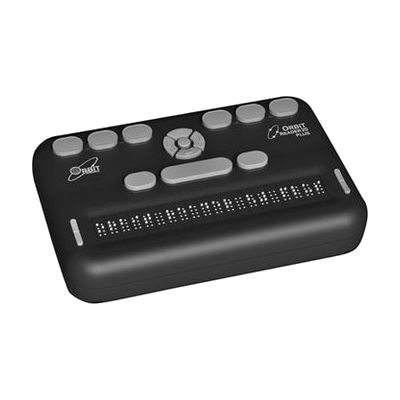
Orbit Reader 20 Plus
Last verified July 5, 2026 · classified July 7, 2026
What it is
Summary
AI-generated from vendor-published content · July 7, 2026
The Orbit Reader 20 Plus is a 20-cell refreshable braille display that also functions as a standalone book reader and note-taker — three devices in one. Someone who is blind or has low vision and uses braille as their primary reading method can use it connected to a computer or phone via Bluetooth or USB, or completely offline by loading files onto an SD card. It works with VoiceOver, BrailleBack, JAWS, NVDA, and other major screen readers across Windows, Mac, iOS, and Android, and can pair with multiple devices simultaneously. Orbit Research built this around their proprietary non-piezoelectric braille cell technology, which is what keeps the price well below most comparable 20-cell displays — but the tradeoff is that cell feel and responsiveness differ from traditional piezoelectric cells, which some experienced braille readers notice immediately. Budget conscious buyers and first-time braille display users tend to find it an excellent value; long-time users of premium displays may want to try one before committing.
Quick Facts Catalog facts · auto-generated
- AT Act lending
- Medicaid waiver
- Out of pocket
- School district
- Vocational rehab
What Setup Looks Like
- Out of the box
Insert an SD card with BRF or text files to read books independently — no computer or pairing needed. - With a guide
- Enable Bluetooth on your computer or smartphone and pair the Orbit Reader 20 Plus like any Bluetooth HID device.
- Activate your screen reader (VoiceOver, NVDA, JAWS, BrailleBack) and select the Orbit Reader as the braille display in settings.
- Full pairing and screen reader configuration typically takes 20–30 minutes. See manufacturer support resources for detailed instructions.
- With professional help
- An assistive technology specialist (ATP) or teacher of the visually impaired (TVI) can configure display settings, grade 1/2 braille preferences, and key mappings for specific screen readers.
- For students, a TVI can pre-load SD cards with appropriate reading materials and set up the note-taking workflow — typically covered in 1–2 sessions.
Getting it
Try Before You Buy
Devices like this are often available to borrow through your state's AT Act program — typically free or low-cost — so you can try it before buying or pursuing funding.
Where to Get It
Some links may be affiliate links — WhatCanHelp may earn a small commission from purchases at no extra cost to you. More on affiliates →
How to Fund This
Equipment like this is often pursued through official state programs. These are common starting points — each program decides its own eligibility and what it covers, so the first step is always a phone call.
Compare & explore
Sources & fine print
Vendor facts (name, price, platforms, vendor link) sourced from Orbit Research — view on vendor site; last verified July 5, 2026.
Classification & description AI-generated from vendor-published content on July 7, 2026 · confidence: high. Vendor specs may lag; verify before relying on details in a clinical or funding artifact.