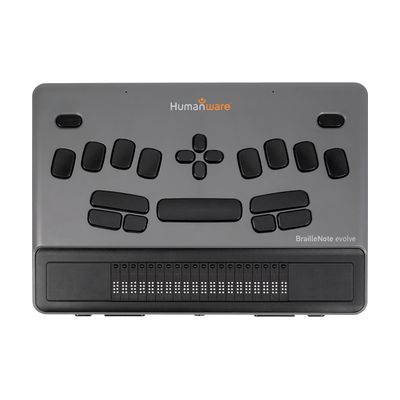
BrailleNote evolve 20
by HumanWare
Price is what the vendor listed when last checked. Confirm it with the vendor before buying.
What it is
Summary
AI-generated from vendor-published content · November 21, 2026
The BrailleNote evolve 20 is a braille note taker that runs HumanWare's KeySoft environment on Windows 11 Pro. A student or professional who reads braille can write, read and collaborate on one device, using Microsoft 365, virtual meetings and Word documents. It has a 20-cell braille display with cursor-routing keys above each cell. NVDA support is built in, and the first six months of JAWS are included. It can also connect wirelessly as a braille display to an iPhone, Mac or Apple TV with VoiceOver, or to a Windows PC running NVDA or JAWS. A 32-cell version is sold separately. At this price and with this much flexibility, many people benefit from a trial and some training before buying.
Getting it
Try before you buy
Devices like this are often available to borrow through your state's AT Act program — typically free or low-cost — so you can try it before buying or pursuing funding.
Where to get it
This is the vendor WhatCanHelp tracks for this product — it may also be available from other retailers or a local supplier, and prices vary.
How to fund this
These are common places to ask about paying for equipment like this. Each one decides its own eligibility and what it covers, so start by asking them.
Details
Quick Facts Catalog facts · auto-generated
- Addresses
- Platform
- Complexity
- Professional guidance helps
- Price
- $5,199.00
- Funding
- AT Act lending
- Out of pocket
- School district
- Vocational rehab
What setup looks like
- Out of the box
Turn it on and open KeySoft to start reading and writing in braille right away. - With a guide
- Connect to Wi-Fi, sign in to Microsoft 365, and choose NVDA or the included JAWS trial as your screen reader.
- To use it as a braille display for a phone or computer, install the Braille Terminal app and pair over Bluetooth. Plan on an hour or two. See manufacturer support resources for detailed instructions.
- With professional help
- A teacher of students with visual impairments (TVI) or an assistive technology professional can help match the device to school or work software and teach KeySoft.
- Expect a few training sessions over several weeks. See manufacturer support resources for detailed instructions.
Compare & explore
More accessible software
-

SoundingBoard
Est. $10–$50
-
-

-
Keeble - AssistiveWare
Est. $4–$20
-

-

Sources & fine print
Vendor facts (name, price, platforms, vendor link) sourced from HumanWare — view on vendor site (opens in a new tab); last checked November 23, 2026.
Classification & description AI-generated from vendor-published content on November 21, 2026 · confidence: high. Vendor specs may lag; verify before relying on details in a clinical or funding artifact.