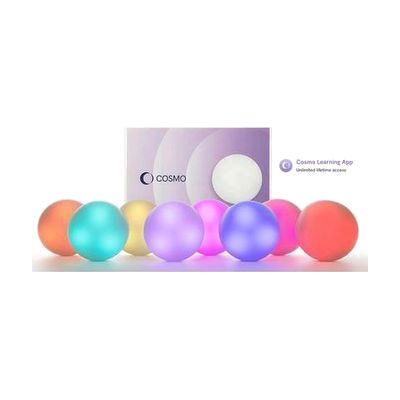
Cosmo Learning System
Last verified July 28, 2026 · classified April 26, 2026
What it is
Summary
AI-generated from vendor-published content · April 26, 2026
The Cosmo Learning System is a set of eight wireless, color-coded tactile buttons (Cosmo Dots) that pair with tablet apps to create hands-on, interactive learning activities. It's designed for children with special educational needs and disabilities (SEND) who benefit from physical, cause-and-effect interaction rather than touchscreen-only input — particularly useful for learners with motor, cognitive, or sensory differences who need concrete, tangible ways to engage with curriculum or therapy tasks. You get the eight Dots plus access to compatible app-based activities, making this a mostly complete system, though a compatible tablet (iOS or Android) is required separately. Getting meaningful use out of this system typically involves some time to explore the apps and match activities to a specific learner's goals, so educator or therapist involvement tends to produce better outcomes than purely independent setup.
Quick Facts Catalog facts · auto-generated
- AT Act lending
- Medicaid waiver
- Out of pocket
- School district
- Vocational rehab
What Setup Looks Like
- Out of the box
- Charge the Cosmo Dots via their charging base.
- Download compatible Cosmo apps from the App Store or Google Play on a supported tablet.
- With a guide
- Pair the Cosmo Dots to the tablet via Bluetooth following the in-app connection prompts.
- Browse available app activities and select ones matched to the learner's current goals.
- Allow 30–60 minutes to explore activity options and configure preferred settings. See manufacturer support resources for detailed instructions.
- With professional help
- A special education teacher, occupational therapist (OT), or speech-language pathologist (SLP) can assess which activities best target the learner's IEP goals and map the Dots' use to specific therapeutic or educational objectives.
- Expect 1–2 guided sessions to identify the most effective activity set and any access modifications needed.
Getting it
Try Before You Buy
Devices like this are often available to borrow through your state's AT Act program — typically free or low-cost — so you can try it before buying or pursuing funding.
Where to Get It
This is the vendor WhatCanHelp tracks for this product — it may also be available from other retailers or a local supplier, and prices vary.
Some links may be affiliate links — WhatCanHelp may earn a small commission from purchases at no extra cost to you. More on affiliates →
As an Amazon Associate we earn from qualifying purchases.
How to Fund This
Equipment like this is often pursued through official state programs. These are common starting points — each program decides its own eligibility and what it covers, so the first step is always a phone call.
Compare & explore
Sources & fine print
Vendor facts (name, price, platforms, vendor link) sourced from Inclusive Technology — view on vendor site; last verified July 28, 2026.
Classification & description AI-generated from vendor-published content on April 26, 2026 · confidence: medium. Vendor specs may lag; verify before relying on details in a clinical or funding artifact.