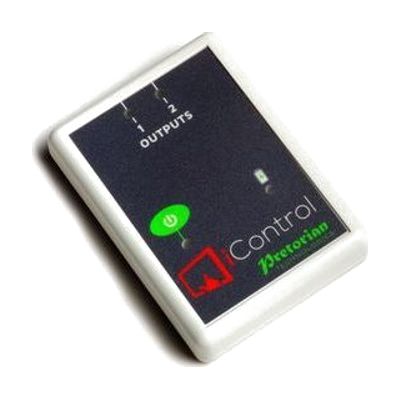
iControl
Price is what the vendor listed when last checked. Confirm it with the vendor before buying.
Last verified September 16, 2026 · classified April 26, 2026
What it is
Summary
AI-generated from vendor-published content · April 26, 2026
The iControl is a wireless interface that lets a tablet (iOS or Android) act as a switch controller for battery-operated toys and appliances, using the companion iClick app to send commands over a wireless connection up to 20 metres. It's designed for children or adults who are learning cause-and-effect relationships or who need an accessible, customizable way to independently operate devices — including people who rely on iOS Switch Control or scanning because they can't reliably use a touchscreen. You get the wireless receiver unit and access to the iClick app, but you'll need your own tablet, your own battery-operated toys or appliances, and potentially battery interrupter cables depending on what you're connecting. The app supports two simultaneous devices and seven control modes (including latching and timed output), which gives it real flexibility, but selecting the right mode and setting appropriate timing for each user genuinely benefits from guidance from an OT or AT specialist.
Quick Facts Catalog facts · auto-generated
- AT Act lending
- Medicaid waiver
- Out of pocket
- School district
- Vocational rehab
What Setup Looks Like
- Out of the box
- Download the iClick app on your iOS or Android tablet.
- Plug battery-adapted toys or appliances into the iControl's two 3.5mm sockets.
- Pair the iControl receiver with the app and tap the on-screen button to activate devices.
- With a guide
- Review mode options (Direct, Latching, Timed, Cooperative, On/Off) and select the appropriate one for the user's current skill level.
- Configure button color, size, or photo overlays in the iClick app to match user's visual or cognitive needs.
- If using iOS Switch Control scanning, set up switch access in iPad Accessibility settings before launching the app — expect 30–45 minutes total for full configuration. See manufacturer support resources for detailed instructions.
- With professional help
- An occupational therapist (OT) or AT specialist should assess the user's motor and cognitive access needs to select the right control mode and timing parameters.
- An SLP or educator may be involved if iControl is being used as part of a cause-and-effect or AAC readiness program.
- Expect 1–2 sessions to establish an appropriate setup, with periodic reassessment as skills develop.
Getting it
Try Before You Buy
Devices like this are often available to borrow through your state's AT Act program — typically free or low-cost — so you can try it before buying or pursuing funding.
Where to Get It
This is the vendor WhatCanHelp tracks for this product — it may also be available from other retailers or a local supplier, and prices vary.
Some links may be affiliate links — WhatCanHelp may earn a small commission from purchases at no extra cost to you. More on affiliates →
As an Amazon Associate we earn from qualifying purchases.
How to Fund This
Equipment like this is often pursued through official state programs. These are common starting points — each program decides its own eligibility and what it covers, so the first step is always a phone call.
Compare & explore
Sources & fine print
Vendor facts (name, price, platforms, vendor link) sourced from Inclusive Technology — view on vendor site; last verified September 16, 2026.
Classification & description AI-generated from vendor-published content on April 26, 2026 · confidence: high. Vendor specs may lag; verify before relying on details in a clinical or funding artifact.