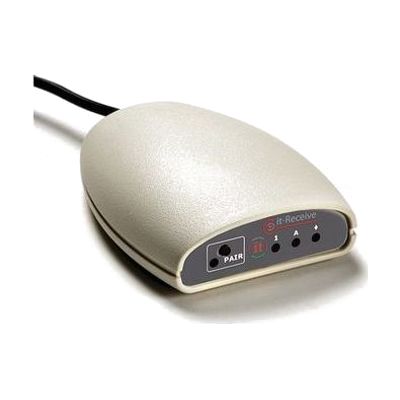
it-Receive
Price is what the vendor listed when last checked. Confirm it with the vendor before buying.
Last verified September 16, 2026 · classified April 26, 2026
What it is
Summary
AI-generated from vendor-published content · April 26, 2026
The it-Receive is a USB wireless receiver hub that connects up to six Simply Works-compatible input devices — switches, joysticks, rollerballs, or keyboards — to a computer without wires, across a range of about 32 feet. It's designed for classrooms or therapy settings where multiple students or a single user needs flexible, cable-free access to computer-based activities using adapted input methods. The receiver pairs with Switch Centre software, which automatically detects what program is running and configures the switch behavior to match, reducing the manual setup burden on teachers and therapists. This is not a standalone solution — it requires compatible Simply Works wireless transmitters (sold separately), the Switch Centre software, and a computer to function.
Quick Facts Catalog facts · auto-generated
- AT Act lending
- Out of pocket
- School district
- Vocational rehab
What Setup Looks Like
- Out of the box
- Plug the it-Receive into a USB port on the computer — it is detected as a plug-and-play device.
- Pair your Simply Works wireless transmitter units (switches, joysticks, etc.) with the receiver.
- With a guide
- Install or verify Switch Centre software is installed and up to date on the host computer.
- Configure individual switch functions for each user's specific needs within Switch Centre.
- Test each paired transmitter device across the full room range to confirm reliable connectivity. Expect 30–60 minutes for multi-device setup. See manufacturer support resources for detailed instructions.
- With professional help
- An assistive technology professional (ATP) or special education teacher should assess which input device types (switch, rollerball, joystick) are appropriate for each student before purchasing transmitters.
- An AT specialist or OT can configure customised switch functions in Switch Centre to match individual access needs and curriculum software in use.
Getting it
Try Before You Buy
Devices like this are often available to borrow through your state's AT Act program — typically free or low-cost — so you can try it before buying or pursuing funding.
Where to Get It
This is the vendor WhatCanHelp tracks for this product — it may also be available from other retailers or a local supplier, and prices vary.
Some links may be affiliate links — WhatCanHelp may earn a small commission from purchases at no extra cost to you. More on affiliates →
As an Amazon Associate we earn from qualifying purchases.
How to Fund This
Equipment like this is often pursued through official state programs. These are common starting points — each program decides its own eligibility and what it covers, so the first step is always a phone call.
Compare & explore
Sources & fine print
Vendor facts (name, price, platforms, vendor link) sourced from Inclusive Technology — view on vendor site; last verified September 16, 2026.
Classification & description AI-generated from vendor-published content on April 26, 2026 · confidence: high. Vendor specs may lag; verify before relying on details in a clinical or funding artifact.