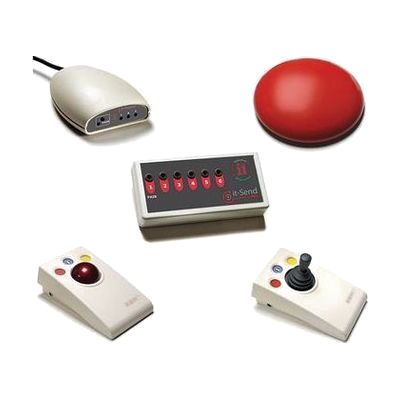
SimplyWorks Access Pack
Last verified June 20, 2026 · classified April 26, 2026
What it is
Summary
AI-generated from vendor-published content · April 26, 2026
The SimplyWorks Access Pack is a wireless alternative input bundle that includes a receiver hub, a low-profile wireless switch, a 6-channel wired-switch transmitter, a rollerball, and a joystick — all designed to work together without cables cluttering a therapy table or classroom desk. It's built for people who can't reliably use a standard mouse or keyboard, whether due to limited hand movement, motor control difficulties, or physical positioning challenges, and works across computers and switch-adapted devices. This is a fairly complete starter kit rather than a single component — you get multiple control options in one purchase, which is useful when you're still exploring which input method works best for a particular person. The wireless components all depend on the it-Receive hub, so you'll need that connected to each computer or device you want to control, and matching the right input method to the right user still benefits from an occupational therapist or AT specialist.
Quick Facts Catalog facts · auto-generated
- AT Act lending
- Medicaid waiver
- Out of pocket
- School district
- Vocational rehab
What Setup Looks Like
- Out of the box
- Plug the it-Receive hub into a USB port on your computer — it should be recognized as a standard HID device with no driver installation required.
- Power on the wireless switch, rollerball, or joystick and pair each to the receiver following the channel-pairing instructions in the box.
- With a guide
- Connect wired switches to the it-Send Pro transmitter and set each switch to an available channel on the receiver.
- Configure your computer's accessibility settings (e.g., mouse keys, switch access in Windows or macOS) to match how each device should behave.
- Test each input method with the intended user and adjust sensitivity or channel assignments as needed — allow 30–60 minutes for initial configuration. See manufacturer support resources for detailed instructions.
- With professional help
- An occupational therapist (OT) or assistive technology professional (ATP) should assess the user's range of motion, positioning, and fatigue to determine which input method (switch, joystick, or rollerball) is most appropriate.
- An SLP or AT specialist may be needed if the pack is being integrated into an AAC or communication workflow alongside switch scanning.
- Expect 1–3 sessions over 1–2 weeks to trial devices, optimize placement and mounting, and confirm the chosen access method is sustainable for the user.
Getting it
Try Before You Buy
Devices like this are often available to borrow through your state's AT Act program — typically free or low-cost — so you can try it before buying or pursuing funding.
Where to Get It
Some links may be affiliate links — WhatCanHelp may earn a small commission from purchases at no extra cost to you. More on affiliates →
As an Amazon Associate we earn from qualifying purchases.
How to Fund This
Equipment like this is often pursued through official state programs. These are common starting points — each program decides its own eligibility and what it covers, so the first step is always a phone call.
Compare & explore
Sources & fine print
Vendor facts (name, price, platforms, vendor link) sourced from Inclusive Technology — view on vendor site; last verified June 20, 2026.
Classification & description AI-generated from vendor-published content on April 26, 2026 · confidence: medium. Vendor specs may lag; verify before relying on details in a clinical or funding artifact.