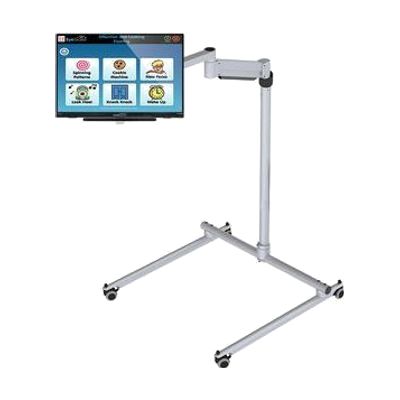
All in One EyeGaze Education: eyetuitive for Windows
by eyetuitive
Est. $800–$2,000, see price history
Typical price range, not a vendor quote. Confirm it with the vendor before buying.
What it is
Summary
AI-generated from vendor-published content · October 1, 2026
This is a ready-to-assemble eye gaze package for a special needs classroom, built around eyetuitive for Windows. The bundle includes a touch PC or monitor, a REHAdapt stand to hold it, and Inclusive EyeGaze software. With eye gaze, a student controls the screen by looking at it instead of using a mouse or touch, which opens up learning activities and communication for children who can't use those tools easily. Because the pieces come together in one package, a school doesn't have to match a tracker, screen, mount, and software on its own. Getting the student positioned well and the tracking calibrated is where a therapist or AT specialist can make a real difference.
Getting it
Try before you buy
Devices like this are often available to borrow through your state's AT Act program — typically free or low-cost — so you can try it before buying or pursuing funding.
Where to get it
This is the vendor WhatCanHelp tracks for this product — it may also be available from other retailers or a local supplier, and prices vary.
How to fund this
These are common places to ask about paying for equipment like this. Each one decides its own eligibility and what it covers, so start by asking them.
Details
Quick Facts Catalog facts · auto-generated
What setup looks like
- Out of the box
Assemble the touch PC or monitor on the REHAdapt stand and power it up. Plan on roughly 30 minutes. - With a guide
- Install and open the Inclusive EyeGaze software, then run the eye tracking calibration with the student seated comfortably in front of the screen.
- Start with simple cause-and-effect activities and build up.
- With professional help
An AT specialist, OT, or SLP can help choose the right activities, check the student's seating and screen position, and fine-tune calibration. Expect a first session of about an hour, with follow-ups as the student's skills grow.
Compare & explore
Sources & fine print
Vendor facts (name, price, platforms, vendor link) sourced from Inclusive Technology — view on vendor site (opens in a new tab); last checked October 31, 2026.
Classification & description AI-generated from vendor-published content on October 1, 2026 · confidence: medium. Vendor specs may lag; verify before relying on details in a clinical or funding artifact.