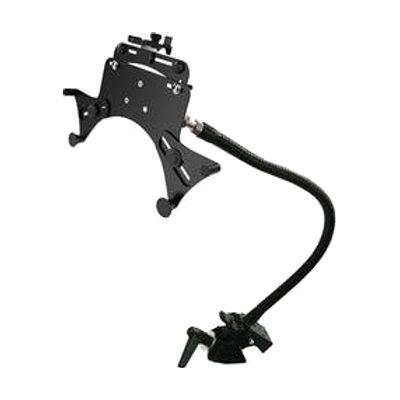
Gooseneck with Universal Tablet Holder
Last verified June 20, 2026 · classified April 26, 2026
What it is
Summary
AI-generated from vendor-published content · April 26, 2026
This is a flexible mounting arm with a clamp-style tablet holder designed to position tablets precisely where someone needs them for hands-free access. The gooseneck arm bends and holds its position, letting you angle a tablet for someone who can't easily hold a device or adjust it themselves — useful for people with limited arm or hand movement, low vision requiring a specific viewing angle, or anyone who needs a tablet secured in one spot for switch access or AAC use. You get the gooseneck arm, a super clamp that grips table edges or round bars (like wheelchair trays or bed rails), and the universal holder that fits tablets from 7 to 13 inches with or without a case. This is a mounting system only — no tablet is included — and fine adjustment requires a 2.5mm Allen key, so initial setup takes some patience and ideally a second person.
Quick Facts Catalog facts · auto-generated
- AT Act lending
- Medicaid waiver
- Out of pocket
- School district
- Vocational rehab
What Setup Looks Like
- Out of the box
Clamp the super clamp to a table edge or round bar and insert your tablet into the holder clip. - With a guide
- Attach the super clamp securely to the mounting surface (table edge, round bar, or wheelchair tray).
- Snap the tablet into the universal holder and connect the holder to the Manfrotto fitting on the gooseneck arm.
- Bend and adjust the gooseneck to the desired angle; use the 2.5mm Allen key to fine-tune and lock knobs as needed — allow 20–30 minutes for first-time positioning.
- See manufacturer support resources for detailed instructions.
- With professional help
- An occupational therapist (OT) or assistive technology professional (ATP) should assess optimal tablet height, angle, and mounting surface relative to the user's positioning and access method (direct touch, switch, eye gaze).
- Expect one session of 30–60 minutes to trial placement alongside the user's seating/positioning system.
Getting it
Try Before You Buy
Devices like this are often available to borrow through your state's AT Act program — typically free or low-cost — so you can try it before buying or pursuing funding.
Where to Get It
Some links may be affiliate links — WhatCanHelp may earn a small commission from purchases at no extra cost to you. More on affiliates →
As an Amazon Associate we earn from qualifying purchases.
How to Fund This
Equipment like this is often pursued through official state programs. These are common starting points — each program decides its own eligibility and what it covers, so the first step is always a phone call.
Compare & explore
Sources & fine print
Vendor facts (name, price, platforms, vendor link) sourced from Inclusive Technology — view on vendor site; last verified June 20, 2026.
Classification & description AI-generated from vendor-published content on April 26, 2026 · confidence: high. Vendor specs may lag; verify before relying on details in a clinical or funding artifact.