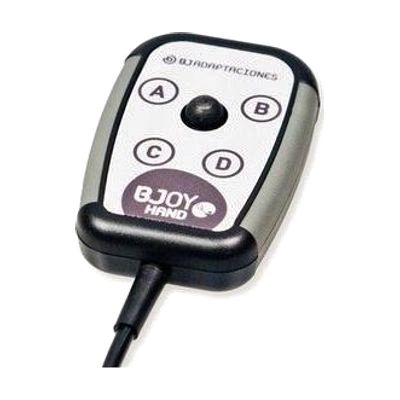
Thumb Mouse-C
Price is what the vendor listed when last checked. Confirm it with the vendor before buying.
Last verified September 16, 2026 · classified June 9, 2026
What it is
Summary
AI-generated from vendor-published content · June 9, 2026
A compact thumb-operated joystick mouse that plugs directly into USB or Lightning/USB-C ports and works without installing drivers on Windows, Mac, Linux, and iPadOS/iOS. It's designed for someone who has limited hand function, fine motor difficulties, or tremors that make a standard mouse hard to control — the micro-switch joystick responds to small, precise thumb or finger movements rather than requiring a full grip and wrist motion. The included configuration software lets users adjust cursor speed, sensitivity, button assignments, and joystick orientation, and those settings are stored on the device itself so they carry over when you plug into a different computer. One real consideration: dialing in the sensitivity and button layout for a specific user's motor profile takes time and some trial-and-error, so while it's technically plug-and-play, getting genuinely useful results usually benefits from working with an OT or ATP.
Quick Facts Catalog facts · auto-generated
- AT Act lending
- Out of pocket
- School district
- Vocational rehab
What Setup Looks Like
- Out of the box
Plug the Thumb Mouse-C into a USB port — cursor control works immediately on Windows, Mac, Linux, and iPadOS/iOS with no driver installation. - With a guide
- Download and install the included configuration software on a Windows or Mac computer.
- Adjust cursor speed, sensitivity, button functions, and joystick orientation to match the user's motor abilities.
- Save settings to the device's onboard memory so they persist across different computers — expect 30–60 minutes for initial configuration. See manufacturer support resources for detailed instructions.
- With professional help
- An occupational therapist (OT) or assistive technology professional (ATP) can assess hand function and motor range to recommend optimal sensitivity, orientation, and button layout.
- If used with iPadOS Switch Control, an ATP can configure the full switch access setup — expect 1–2 sessions.
Getting it
Try Before You Buy
Devices like this are often available to borrow through your state's AT Act program — typically free or low-cost — so you can try it before buying or pursuing funding.
Where to Get It
This is the vendor WhatCanHelp tracks for this product — it may also be available from other retailers or a local supplier, and prices vary.
Some links may be affiliate links — WhatCanHelp may earn a small commission from purchases at no extra cost to you. More on affiliates →
As an Amazon Associate we earn from qualifying purchases.
How to Fund This
Equipment like this is often pursued through official state programs. These are common starting points — each program decides its own eligibility and what it covers, so the first step is always a phone call.
Compare & explore
Sources & fine print
Vendor facts (name, price, platforms, vendor link) sourced from Inclusive Technology — view on vendor site; last verified September 16, 2026.
Classification & description AI-generated from vendor-published content on June 9, 2026 · confidence: high. Vendor specs may lag; verify before relying on details in a clinical or funding artifact.