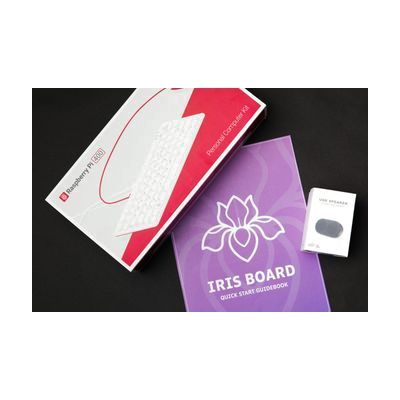
Iris Board
by American Printing House for the Blind
Price is what the vendor listed when last checked. Confirm it with the vendor before buying.
What it is
Summary
AI-generated from vendor-published content · November 15, 2026
The Iris Board teaches touch typing to students who are blind or low vision, using a compact keyboard with the lessons built in. Students get spoken instructions and instant audio feedback as they work through structured lessons, practice activities, and games. It needs no separate computer, screen reader, or earlier keyboard knowledge, and it connects to an included speaker. An external monitor can be added for students who also use some vision. Teachers can customize lessons and assessments, so it suits a classroom or a student working with a vision teacher. The packaging carries a small-parts choking hazard warning, so it's meant for supervised use with young children.
Getting it
Try before you buy
Devices like this are often available to borrow through your state's AT Act program — typically free or low-cost — so you can try it before buying or pursuing funding.
Where to get it
This is the vendor WhatCanHelp tracks for this product — it may also be available from other retailers or a local supplier, and prices vary.
How to fund this
These are common places to ask about paying for equipment like this. Each one decides its own eligibility and what it covers, so start by asking them.
Details
Quick Facts Catalog facts · auto-generated
- Addresses
- Platform
- Age range
- Complexity
- Setup with instructions
- Price
- $219.00
- Funding
- AT Act lending
- Out of pocket
- School district
What setup looks like
- Out of the box
Connect the keyboard to the included speaker and power it on. The unit includes its own typing software and text-to-speech. - With a guide
- Plug in an external monitor if the student benefits from seeing the screen. This step is optional.
- Have a teacher or family member listen to the first lesson with the student and look through the customizable lessons and assessments, about 30 minutes in all.
Compare & explore
More accessible software
-
Inclusive Sensory Vibration Bundle
Est. $150–$450
-
TD Snap
Est. $100–$300
-
-
-
-
Sources & fine print
Vendor facts (name, price, platforms, vendor link) sourced from American Printing House for the Blind — view on vendor site (opens in a new tab); last checked November 23, 2026.
Classification & description AI-generated from vendor-published content on November 15, 2026 · confidence: high. Vendor specs may lag; verify before relying on details in a clinical or funding artifact.